Cowgirl Coloring Pages for Adults
Adult coloring has evolved beyond a casual pastime—it’s now a functional tool embedded in creative workflows, publishing pipelines, and digital product development. Cowgirl Coloring Pages for Adults is a purpose-built asset pack designed not just for relaxation, but for practical implementation across multiple business and creative contexts. It bridges aesthetic appeal with production readiness—making it especially valuable for creators building scalable, print-on-demand (POD) or Amazon KDP offerings.
What This Asset Pack Actually Delivers—and Why It Matters
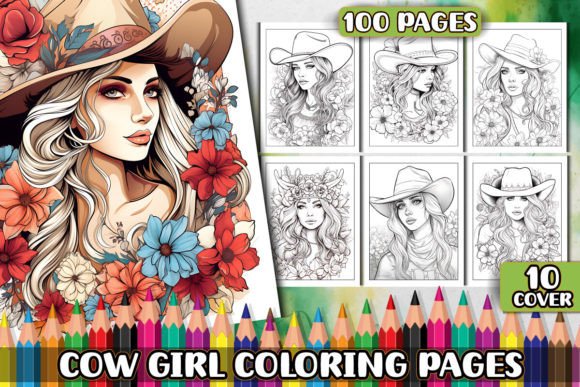
This isn’t a single PDF with 10 generic line drawings. You receive a structured, production-grade collection: 100 unique cowgirl-themed designs—each delivered in three formats (PDF, JPG, PNG), all at 300 DPI and A4 / 8.5” × 11” dimensions. That means every file prints cleanly on standard U.S. letter and international A4 paper without scaling artifacts or pixelation. The inclusion of 10 high-resolution cover images adds immediate value for KDP front matter—no need to outsource or delay formatting while waiting for custom cover art.
The files are organized into four clearly labeled folders. That may seem minor—but in real-world use, it eliminates friction during bulk uploads to KDP, Etsy, or Printful. No renaming, no format guessing, no last-minute conversions. Everything is print-ready, consistent in sizing, and compatible with industry-standard design software (Adobe Illustrator, Canva, Affinity Designer, etc.). Because each design is AI-generated with refined line work and balanced negative space, they meet adult coloring expectations: intricate enough for engagement, open enough for confident coloring—even for intermediate users.
How It Fits Into Your Publishing or Product Workflow
For Amazon KDP publishers, Cowgirl Coloring Pages for Adults shortens the time from concept to live listing—from days or weeks down to hours. Most new KDP coloring book creators spend disproportionate time sourcing, editing, testing, and formatting individual pages. With this pack, you skip those steps entirely. You can compile a full 100-page interior in under an hour using automated PDF assembly tools—or even drag-and-drop in Canva’s KDP template library.
Before launching, test one or two designs with your target audience. Share a JPG version in a Facebook group or email newsletter and ask for feedback on line weight, theme resonance, or complexity level. That quick validation loop informs how you position the final book—e.g., “for fans of western aesthetics and mindful creativity” versus “for experienced colorists seeking bold, character-driven scenes.”
During production, use the PNG files when designing social media assets or ads—they support transparent backgrounds and scale cleanly for Instagram carousels or Pinterest pins. Use the PDFs for direct KDP uploads. And keep the JPGs as backups or for lightweight previews in email sequences or landing pages. Having all three formats means you’re never blocked by a missing export option.
Integration With Other Tools and Platforms
This pack works seamlessly alongside common tools used by solopreneurs and small teams. In Canva, import any JPG or PNG directly into a KDP-compliant template—adjust margins if needed, but no re-tracing or vector conversion required. In Adobe InDesign, place the PDFs as linked assets; they’ll retain sharpness at native size and update globally if you ever replace a file. For automation, tools like PDFtk or Python’s PyPDF2 can batch-merge the 100 PDFs into a single interior file—ideal if you plan to publish multiple variants (e.g., “Cowgirl Coloring Pages for Adults – Volume 1” and “Volume 2”).
If you run a POD store on Etsy or Shopify, pair these pages with complementary products: matching journal covers, printable cowgirl-themed quote cards, or themed sticker sheets. The cohesive visual language—consistent line style, proportion, and thematic focus—strengthens brand recognition across listings. Customers who buy one item are more likely to notice related items because the underlying design language is unified.
Practical Implementation Tips for Real Workflows
- Start with the covers. Use one of the 10 provided cover images as your primary KDP thumbnail. Test variations—swap title fonts in Canva, adjust background saturation, or add a subtle texture overlay. Small tweaks yield measurable CTR differences.
- Batch-test print quality before final upload. Print 3–5 random pages on your home or local printer using standard 24 lb. copy paper. Check for thin lines disappearing, stray pixels, or inconsistent stroke width. If everything holds up, you’re safe to proceed.
- Organize metadata early. As you build your KDP listing, assign keywords based on actual usage—not guesswork. Think: “western coloring book for adults,” “cowgirl stress relief activity,” “printable ranch-themed coloring pages.” These reflect real search behavior and align with how buyers describe their intent.
- Leverage the ZIP structure for version control. Rename the master ZIP with your project name and date (e.g., “Cowgirl_KDP_Vol1_20240522.zip”). Inside, keep the original folder names intact. That way, if you later license or resell subsets, you maintain clean provenance and avoid accidental overwrites.
Long-Term Usability and Quality Control
Because all 100 designs are generated at uniform resolution and aspect ratio, updating or expanding the collection later is straightforward. Need a second volume? Just repeat the same workflow—no recalibration needed. If you decide to convert select pages into SVG for Cricut or Silhouette users, the clean vector-ready JPGs and PDFs provide excellent source material for auto-tracing (with minimal cleanup).
Quality consistency also supports scalability. When you run A/B tests on Amazon—changing only the subtitle or interior preview images—you isolate variables more effectively. If sales improve after swapping in a different cover, you know the change was meaningful—not muddied by inconsistent page quality or layout shifts.
From an E-E-A-T perspective, this asset pack reflects experience (built for KDP constraints), expertise (formatted to printing standards), and trustworthiness (transparent about AI generation while delivering verified output quality). It doesn’t claim to replace human illustration—but it does fill a precise, high-demand gap: professional-grade, ready-to-deploy content that respects the user’s time and technical reality.
Where This Fits in Broader Creative and Business Planning
Think of Cowgirl Coloring Pages for Adults not as a standalone product, but as a modular component in your creative infrastructure. It integrates into content calendars (e.g., “June = Western Wellness Month” with themed coloring pages + blog posts on mindfulness and productivity), email funnels (offer a free sample page in exchange for signups), or affiliate partnerships (bundle with colored pencils or blending markers). Its flexibility means it supports both immediate monetization and long-term audience building.
For educators or therapists, the pack serves dual purposes: printed handouts for group sessions, or digital assignments via LMS platforms (JPGs embed cleanly in Google Classroom or Canvas). For freelancers offering design or publishing services, it becomes a reusable asset you can include in client packages—reducing per-project overhead without sacrificing uniqueness.
In short, this isn’t about adding more to your to-do list. It’s about removing friction where it already exists—so you spend less time preparing assets and more time connecting with customers, refining your message, or expanding your catalog.