Easter Activity Book for Kids Volume – 3
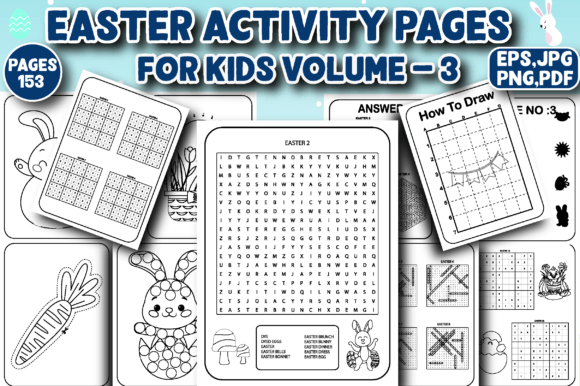
If you're building a high-content activity book business on Amazon KDP—or even just launching your first themed workbook—you’ll want to pay close attention to Easter Activity Book for Kids Volume – 3. This isn’t just another collection of seasonal printables. It’s a fully tested, production-ready interior designed specifically for creators who value quality, consistency, and buyer satisfaction. With 153 pages of carefully balanced activities—including coloring pages, dot-to-dot, Sudoku, word search, scissor skills, mazes, shadow matching, step-by-step “how to draw” prompts, and dot marker exercises—it bridges developmental learning with holiday fun in a way that stands out in a crowded Easter category.
Why this volume works where others fall short
Many creators assume that adding “Easter” to a title and tossing in a few bunnies guarantees visibility. But Amazon shoppers—especially parents, teachers, and homeschoolers—look beyond the cover. They scan interiors for variety, age-appropriateness, visual clarity, and practical usability. Easter Activity Book for Kids Volume – 3 delivers across all three. The A4 / 8.5×11″ layout ensures clean printing on standard paper without cropping or scaling issues. More importantly, each activity type is intentionally paced: early pages support fine motor development (scissor skills, dot markers), mid-sections build logic and focus (Sudoku, mazes, word search), and later pages encourage creativity and confidence (how-to-draw, shadow matching). That progression isn’t accidental—it reflects real classroom and home learning rhythms.
A common mistake: assuming “print-ready” means “plug-and-play”
Here’s where many creators stumble—not with the content itself, but with how they prepare it for upload. Just because a file is labeled “print ready” doesn’t mean it’s optimized for KDP’s specific requirements. For example, some sellers upload the EPS file directly, not realizing KDP doesn’t accept EPS for interior uploads. Others use the JPG version at 300 dpi but forget to embed color profiles or flatten layers, resulting in washed-out colors or unexpected transparency glitches during preview. Worse, a few skip checking bleed and margin settings—even though Easter Activity Book for Kids Volume – 3 includes safe margins built-in, misalignment during PDF export can still push key elements too close to the edge.
The fix? Always generate your final KDP interior PDF from the provided PDF file—not from exported JPGs or screenshots. That PDF was pre-tested with KDP’s online previewer and physical proof copies. If you need to add your own cover or adjust metadata, do so *after* confirming the interior renders correctly in KDP’s preview tool. And never rename or compress the original PDF without rechecking page alignment, especially if you’re inserting copyright pages or disclaimers.
Another overlooked detail: activity balance affects perceived value
Shoppers compare activity books by scanning the interior thumbnail gallery. If 60% of the pages are coloring sheets with minimal variation—or if all the mazes look nearly identical—they’ll bounce fast. Easter Activity Book for Kids Volume – 3 avoids this trap with intentional diversity: 12 unique dot-to-dot puzzles (ranging from 10–45 points), 10 themed Sudoku grids (4×4 and 6×6 for younger solvers), and 8 shadow-matching challenges using Easter objects drawn from multiple angles. Even the “how to draw” section walks kids through drawing a basket, chick, egg, and bunny—each broken into four clear steps, not vague outlines.
So before uploading, open your KDP preview and scroll through *every* page thumbnail—not just the first ten. Ask yourself: Does variety hold up past page 30? Do puzzle instructions appear consistently (e.g., “Find and circle all the Easter words” appears in the same font and location each time)? Is there enough white space around text and images to prevent visual fatigue? If the answer to any is “no,” revisit your layout—not the content.
Don’t ignore file format strengths—and limits
This package gives you four formats: EPS, PDF, JPG, and PNG—all at 300 dpi. That’s excellent, but each serves a different purpose:
- PDF: Use this for your KDP interior upload. It preserves vector clarity, fonts, and layer integrity.
- JPG & PNG: Ideal for marketing—social media teasers, email banners, or your Etsy or Gumroad store. PNG supports transparency; JPG loads faster on blogs.
- EPS: Keep this for future edits only—like adding your logo to a single page or adjusting a color palette in Illustrator. Never upload EPS to KDP.
One creator we worked with uploaded the PNG set thinking “higher resolution = better.” But PNGs don’t retain editable text or vector paths, and KDP converted them into raster-heavy PDFs that increased file size unnecessarily—slowing down preview loading and triggering a “low-resolution image” warning in some devices. Stick to the PDF unless you’re modifying design elements.
What to verify before listing
Before hitting “Publish” on KDP, run through these quick checks:
- Page count: Confirm it’s exactly 153 pages. Some users accidentally duplicate the title or instruction page during assembly.
- First and last pages: Ensure the first page is a clean title spread (no blank verso) and the last page ends with an activity—not a half-finished maze or clipped image.
- Font legibility: Zoom to 200% in the KDP preview. Can you read the word search instructions comfortably? Are dot-to-dot numbers crisp, not pixelated?
- Color consistency: Check if reds and yellows appear vibrant in both preview and physical proof. If they look dull, your monitor calibration may differ from KDP’s CMYK output—so rely on the proof copy, not screen-only judgment.
Finally, remember: Easter Activity Book for Kids Volume – 3 is built for reuse—not just as a standalone title, but as a foundation. You can easily rebrand it for Christian schools (add scripture references), adapt it for occupational therapy (highlight scissor-skill progression), or split it into smaller themed workbooks (e.g., “Easter Mazes & Logic Puzzles”). But only if you treat the files with intention—not as disposable assets.
When done right, this interior doesn’t just sell. It earns repeat buyers, positive reviews, and organic keyword traction—because it solves real problems: keeping kids engaged during spring break, supporting fine motor goals, and giving educators a no-prep resource that actually works. That’s the difference between a book that fades after Easter Sunday and one that earns shelf space year after year.