Little Bird Coloring Page for Kids
If you're building a KDP coloring book business—or expanding your POD product line—you need assets that stand out in a crowded marketplace while delivering real production flexibility. The Little Bird Coloring Page for Kids isn’t just another clipart bundle. It’s a thoughtfully crafted, high-resolution design system built for creators who value both aesthetic charm and technical precision.
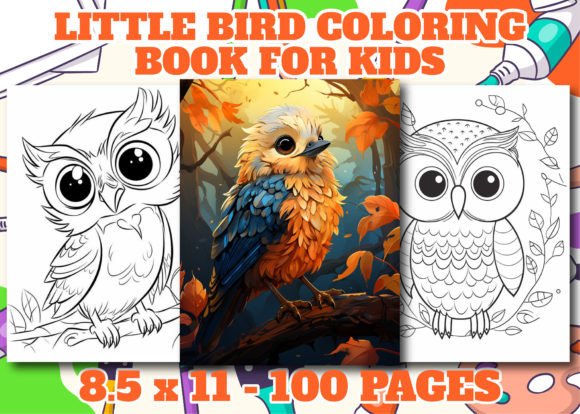
Visually, this collection centers on a single, expressive little bird—friendly but not cutesy, detailed but not overwhelming. Its outline is clean and confident: smooth curves for wings, subtle texture hints in feathers, gentle posture, and just enough personality in the eye and beak to invite engagement without dictating emotion. The linework balances simplicity and character—thick enough for young hands to color confidently, yet refined enough to hold up at larger print sizes or in editorial layouts. There’s no shading, no grayscale, no gradients—just crisp, intentional black-and-white line art. That restraint is deliberate: it ensures clarity across printing methods, scales beautifully, and gives kids room to interpret rather than trace.
Why This Design Fits Real Publishing Workflows
When you’re uploading to Amazon KDP, every pixel matters—not just for aesthetics, but for compliance. This pack delivers exactly what the platform expects and rewards: 300 DPI resolution, A4 and US Letter (8.5” × 11”) dimensions, and files pre-formatted for interior use. You get one polished PDF ready for immediate upload, plus 50 PNGs (transparent background, lossless) and 50 AI vector files. That means you can isolate elements, adjust stroke weight, recolor accents for themed editions, or extract the bird for cover mockups—all without quality loss.
The included high-quality cover image isn’t an afterthought. It’s designed with KDP’s thumbnail constraints in mind: strong focal point, balanced negative space, and legible title treatment even at 150px width. You can resize it, add your branding, or use it as-is—no guesswork needed.
More Than Just Pages—It’s a Scalable Asset System
This isn’t a static set of 50 identical birds. Each PNG and AI file represents a distinct variation: different poses (perched, mid-hop, head tilted), seasonal touches (a tiny flower in its beak, a leaf behind its wing), and compositional options (full-page, corner accent, border element). That variety lets you build cohesive books without repetition fatigue—critical when readers flip through 60+ pages.
Because all files are vector-based (AI), you retain full editability. Want to pair the bird with a “Spring Garden” theme? Scale it to fit a custom border. Need a subtle watermark for your digital preview? Drop the transparent PNG into Canva at 15% opacity. Building a matching activity pack? Extract the bird’s wing as a standalone stencil graphic. The flexibility lives in the format—not just the concept.
Designing With Intention, Not Just Convenience
Many coloring page bundles sacrifice structure for quantity. This one assumes you’re designing *for people*, not just uploading files. The line weight is consistent across all 50 illustrations—no sudden jumps from 1pt to 3pt strokes that confuse motor control in early learners. Curves are optimized for hand-eye coordination: gentle arcs, open loops, and clear separation between elements (e.g., tail feathers don’t tangle with legs). That attention shows up in reviews—and repeat purchases.
You’ll also notice thoughtful spacing. Margins are generous but not wasteful. No critical details sit within KDP’s printable “safe zone” cutoff. Text placeholders (for titles or instructions) align cleanly with standard grid systems in InDesign or Affinity Publisher. If you’re using Canva or Visme, the PNGs drop in without distortion or fuzzy edges.
Practical Integration Across Your Creative Stack
These files work where you actually create—not just where you publish. Use the AI files in Illustrator to build branded activity kits. Drop PNGs into Notion or Google Slides for classroom handouts. Import the PDF into Acrobat to add interactive elements (like clickable answer keys for educational extensions). Even if you’re not a designer, the consistency across formats lowers your learning curve: same proportions, same baseline alignment, same visual language.
For marketers and bloggers, the bird works beyond coloring books. It’s a recognizable motif for email headers, Pinterest pins, or Instagram story stickers—especially when paired with soft pastel backgrounds or minimalist typography. Crafters repurpose the outlines for iron-on transfers or Cricut cutting files. Educators adapt individual pages for fine-motor skill worksheets or ESL vocabulary builders (bird → nest → egg → sky).
Licensing Clarity—No Surprises, No Restrictions
All files come with full commercial rights. You can sell unlimited physical and digital copies on Amazon KDP, Etsy, your own Shopify store, or through wholesale channels. No attribution required. No limits on derivatives—meaning you can modify, combine, or repackage these assets into new products (e.g., a “Bird Watcher’s Journal” with lined pages + this illustration + species facts). The license covers both personal and commercial use, so you’re covered whether you’re testing a concept or scaling a six-figure KDP catalog.
That said—read the fine print on *your* end. If you’re bundling with third-party fonts or stock photos, verify their licenses separately. This pack stands alone, but integration requires awareness.
Getting Started Without Overcomplicating It
You don’t need advanced software to begin. Start with the PDF: upload it directly to KDP as your interior. Then, browse the PNGs to identify 3–5 favorites for your cover, back matter, or bonus pages. Open one AI file in Illustrator (or Affinity Designer) just to test resizing—notice how crisp the edges stay at 200%. That’s your signal: this is production-ready, not placeholder art.
If you’re pairing with typography, lean into contrast. Use a warm, rounded sans serif (like Quicksand or Nunito) for titles—its friendliness echoes the bird’s expression. For body text, choose a highly legible, neutral font (Lora or Karla work well) to keep focus on the illustrations. Avoid overly decorative display fonts in captions; clarity trumps flair when guiding young colorists.
Finally—test print one page before bulk uploading. Check line integrity at actual size, confirm margins align with KDP’s guidelines, and verify that thin strokes (like feather tips) reproduce clearly on your target paper stock. Small checks now prevent customer complaints later.
The Little Bird Coloring Page for Kids succeeds because it bridges intention and execution. It’s not just printable—it’s adaptable. Not just charming—it’s functional. And not just available—it’s engineered for the real workflows of creators who ship, iterate, and grow.