50 Editable KDP Interiors Mega Bundle
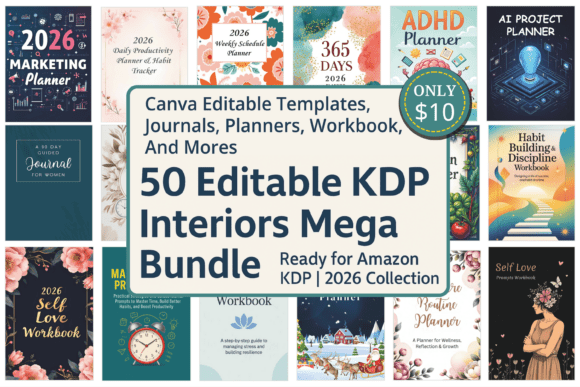
If you’ve ever spent hours formatting a planner interior in Canva—only to realize the margins are off, the bleed isn’t set for KDP, or the fonts won’t embed properly—you’re not alone. The 50 Editable KDP Interiors Mega Bundle solves that exact problem: it’s a curated collection of 50 professionally designed, print-ready interiors—each fully editable in Canva—that meet Amazon KDP’s technical requirements out of the box.
This isn’t just another template pack. It’s built for authors, digital creators, and print-on-demand sellers who want speed *and* polish—without sacrificing control. Every interior comes with matching cover templates, pre-configured CMYK color profiles, correct trim sizes (6"x9", 8.5"x11", etc.), and embedded bleed and safety margins. And because they’re built for Canva—not Photoshop or Illustrator—they’re accessible whether you’re new to design or have been publishing for years.
What People Often Get Wrong (Before They Even Open the Files)
A common oversight is assuming “editable” means “plug-and-play for any use case.” In reality, many users skip checking two critical things: file compatibility and intended audience alignment. For example, the ADHD Planner For Women uses spaced-out layouts, chunked sections, and visual cues tailored to neurodivergent focus patterns—but if you repurpose it as a generic business agenda without adjusting those structural elements, the usability drops significantly. Likewise, the Garden Planning journal includes seasonal checklists and plant spacing grids; using it as a habit tracker dilutes its value and confuses readers.
Another frequent misstep? Assuming all interiors are equally optimized for both print *and* digital delivery. While every file in the 50 Editable KDP Interiors Mega Bundle generates clean, KDP-compliant PDFs, some—like the Brain Dump Idea Journal or Business Idea Journal—are intentionally minimalist to support handwritten use. If you plan to sell a fillable PDF version, you’ll need to add form fields manually in Adobe Acrobat—not Canva. That step isn’t included, and skipping it leads to frustrated buyers reporting “blank pages” or “can’t type anywhere.”
Formatting Pitfalls That Cost Time (and Sales)
Even with perfect templates, small oversights derail results. One recurring issue is font substitution. Canva lets you change fonts freely—but not all fonts render reliably across devices or convert cleanly to PDF. If you swap the original font for something unsupported (e.g., a trendy handwritten script without full character sets), your exported PDF may show missing glyphs or default to Times New Roman mid-page. Worse, KDP sometimes rejects files with inconsistent font embedding.
The smarter approach? Stick to Canva’s system-safe fonts (like Inter, Lato, or Montserrat) or upload licensed Google Fonts *before* editing. All interiors in the bundle use these by default—so unless you intentionally replace them, you’re already in the safe zone.
Margin misalignment is another quiet killer. Some users edit text boxes right up to the edge of the page, forgetting that KDP requires a 0.25" margin from the trim line—and even more for the gutter on facing pages. The bundle interiors bake those constraints in, but if you drag a header or footer outside the safe zone during customization, you risk content being cut off or appearing too cramped. Always preview your final PDF using KDP’s online previewer before uploading.
Why “Matching Covers” Matter More Than You Think
It’s tempting to treat covers and interiors as separate tasks. But cohesion drives trust—and sales. A vibrant, modern cover paired with a dated, cluttered interior creates cognitive dissonance. Readers expect consistency in tone, spacing, and hierarchy. The 50 Editable KDP Interiors Mega Bundle includes matching cover templates for each interior, using the same color palettes, typography scale, and layout logic. That doesn’t mean you must use them as-is—but it does mean you have a reliable starting point for brand alignment.
For instance, the 2026 Self Love Workbook uses soft pastel accents, generous whitespace, and gentle prompts. Its matching cover mirrors that calm energy. If you instead pair it with a high-contrast, bold-font cover meant for a productivity planner, your book may attract the wrong audience—or worse, confuse your ideal readers about what they’re actually buying.
What to Verify Before You Customize (or Buy)
Before diving into edits—or committing to the bundle—ask yourself three practical questions:
- Do I know my target trim size? Not all planners sell equally well at 6"x9". The 2026 Weekly Schedule Planner works best at 8.5"x11" for writing space; the Gratitude Prompts Journal for kids shines at 7"x10". Check KDP’s bestseller data for your niche before locking in dimensions.
- Am I clear on usage rights? These interiors are licensed for commercial use—including selling printed books and digital downloads—but not for reselling the templates themselves or claiming authorship of the original design. Read the license summary included in the download folder.
- Do I have a workflow for version control? Editing 50+ files means keeping track of variations. Rename files clearly (e.g., “SelfLove_Workbook_v2_BlueTheme”) and save both Canva links *and* exported PDFs—not just one or the other.
Realistic Expectations, Real Results
This bundle won’t write your content for you—and it shouldn’t. Its strength lies in removing technical friction, not creative responsibility. You still need compelling titles, accurate subtitles, thoughtful prompts, and audience-aligned language. A beautifully formatted Cognitive Behavioral Therapy CBT Journal falls flat without clinically sound exercises. Likewise, the Anxious Attachment Workbook gains authority when paired with brief, compassionate instructions—not just blank reflection pages.
Think of the 50 Editable KDP Interiors Mega Bundle as your production partner: consistent, reliable, and quietly intelligent about KDP’s quirks. Use it to accelerate time-to-market—not to shortcut research, testing, or reader empathy. When you combine solid structure with authentic voice, that’s when your next KDP title stops blending in and starts standing out.