Wedding Planner Canva KDP: A Practical, Production-Ready Interior for Self-Publishing
For creators building wedding-themed digital products on Amazon KDP, finding an interior that’s both functional and platform-compliant is often more time-consuming than expected. The Wedding Planner Canva KDP addresses this directly—not as a generic printable or standalone Notion template, but as a fully preconfigured, bleed-ready interior file built specifically for Kindle Direct Publishing. It’s designed to minimize technical friction while delivering consistent utility across planning phases.
What Makes This Wedding Planner Canva KDP Distinctive?
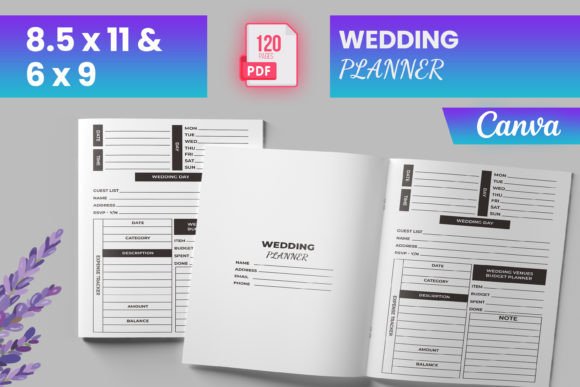
This isn’t a collection of isolated Canva designs repurposed for print. The Wedding Planner Canva KDP arrives as a tested, cohesive 120-page interior with intentional structure: intro page, logical section sequencing (from early budgeting through post-wedding notes), and consistent formatting across all components. Its dimensions—6″ × 9″, 8.5″ × 11″, and other standard KDP sizes—are pre-set and verified, eliminating guesswork during upload. Files include PDF (ready for immediate KDP submission), plus PNG and JPG exports—useful for marketing visuals or custom cover pairing.
Crucially, the interior includes bleed, meaning content extends slightly beyond the trim edge—a requirement KDP enforces for professional-looking printed books. Many planners skip this step, resulting in white borders or misaligned elements after printing. Here, bleed is integrated and validated, reducing the chance of rejection or reformatting delays.
Structure That Supports Real Planning Workflows
The layout reflects how couples actually move through wedding preparation—not as a linear checklist, but as overlapping, iterative tasks. Sections like Wedding Venues Comparison, Rehearsal Preparation Sketch, and Wedding Ceremony Tracker anticipate decision points where visual comparison or spatial planning matters. Others—Bride & Groom Preparation, Honeymoon Planner Notes, and After the Wedding—acknowledge that timelines extend beyond the ceremony itself.
Contact lists are segmented thoughtfully: separate pages for bridesmaids, groomsmen, flower girls, and ring bearers avoid clutter while supporting role-specific coordination. Budget tools aren’t just spreadsheets—they’re embedded within context, like pairing expense tracking with vendor categories (catering, photography, attire). Even the Gift Ideas section avoids vague prompts, instead prompting users to note gifting status, recipient, and date sent—details that matter when managing thank-you timelines.
Quality and Usability in Practice
Because the Wedding Planner Canva KDP was tested on Amazon KDP before release, it avoids common pitfalls: inconsistent margins, unembedded fonts, or RGB-to-CMYK conversion issues. Text remains legible at standard print sizes, and line weights hold up without pixelation—even in detailed sketches or timeline bars. Grids and checkboxes use crisp vector-style strokes, not rasterized approximations.
That said, usability depends on user intent. If you’re publishing a premium planner with custom illustrations or branded typography, this serves best as a structural foundation—not a final design. The included PNG/JPG files let you extract individual pages for social media snippets or blog posts, but they’re not layered source files. There’s no editable Canva link provided; the “Canva” in the name refers to the design aesthetic and tool-agnostic adaptability—not live collaboration access.
Flexibility Without Compromise
While the interior is fixed in sequence and layout, its utility scales across audiences. Wedding coordinators can use it as a client-facing workbook during consultations. Educators teaching event management might assign sections as case-study exercises. Freelance designers can pair it with a custom cover and introduction to create a niche offering—say, a “Micro-Wedding Planner” variant focused on elopements and backyard ceremonies.
The PDF is flat (not password-protected or flattened), meaning users can add text in compatible PDF editors—but it’s not form-fillable out of the box. That’s intentional: KDP doesn’t support interactive forms in paperback interiors, and locking fields would limit flexibility for those who prefer handwritten input. Instead, spacing and alignment prioritize pen-and-paper use, with generous line height and clear section dividers.
Who Benefits Most—and When?
This Wedding Planner Canva KDP fits creators who value reliability over novelty. It’s especially useful if you:
- Need a production-ready interior within 24 hours—not days of troubleshooting margins and bleed settings;
- Are launching multiple wedding-related titles and want consistent internal structure across your catalog;
- Prefer working from a proven base rather than designing every page from scratch;
- Sell physical copies and need predictable print results without ordering proof copies repeatedly;
- Support clients or readers who rely on tactile planning—not just digital apps.
It’s less suited for those seeking highly personalized branding (e.g., custom watermarks, proprietary color palettes applied globally) or advanced functionality like QR-linked vendor directories. Those needs require deeper customization—or a hybrid approach, using this interior as a starting point and layering in bespoke assets.
Realistic Considerations Before You Use It
Like any template, effectiveness depends on integration. For example, the Important Dates tracker assumes users will manually enter milestones—not sync with calendar apps. That’s appropriate for a printed planner but worth noting if your audience expects digital interoperability. Similarly, the Guest List pages provide space for names, RSVP status, and meal choices, but don’t include sorting or filtering. That’s a trade-off: simplicity over complexity.
Also, while the 120-page count offers breadth, some sections may overlap in function—like two versions of a Wedding To Do List. That redundancy isn’t a flaw; it reflects how planning evolves. Early-stage lists focus on vendor bookings, while later ones shift to day-of logistics. Still, creators should review flow before publishing to ensure pacing matches their target reader’s experience level—whether they’re newly engaged or managing a tight six-month timeline.
Long-Term Value Beyond the First Upload
Once uploaded, the Wedding Planner Canva KDP becomes a stable asset—not something requiring quarterly updates. Unlike digital tools dependent on platform changes or subscription models, this interior remains usable as long as KDP accepts standard PDF submissions. Its modularity also supports iteration: you can publish a “Deluxe Edition” by adding a 16-page vendor directory appendix, or create a companion journal with matching typography and bleed specs.
For educators or small studios, it also functions as a teaching aid—demonstrating how to structure long-form planning resources, balance whitespace with density, and meet print specifications without sacrificing clarity. That dual utility—operational tool and implicit design reference—adds quiet, lasting value beyond immediate publication needs.